
Planning a mobile app for your business? Sooner or later, a developer will ask you: "Do you want a native app or a Flutter app?" If you are not technical, that question can feel like being asked to pick an engine for a car you have not designed yet.
The good news is that you do not need to understand code to make a sound choice. You need to understand what each option means for your budget, your launch date and the features your app needs. This guide explains the difference, compares the two on the points that matter to a business, and gives you five questions to help you decide.
If you are still deciding who to hire, read our guide to the costly mistakes businesses make when hiring a mobile app development company in Chennai first.
What Is Native App Development?
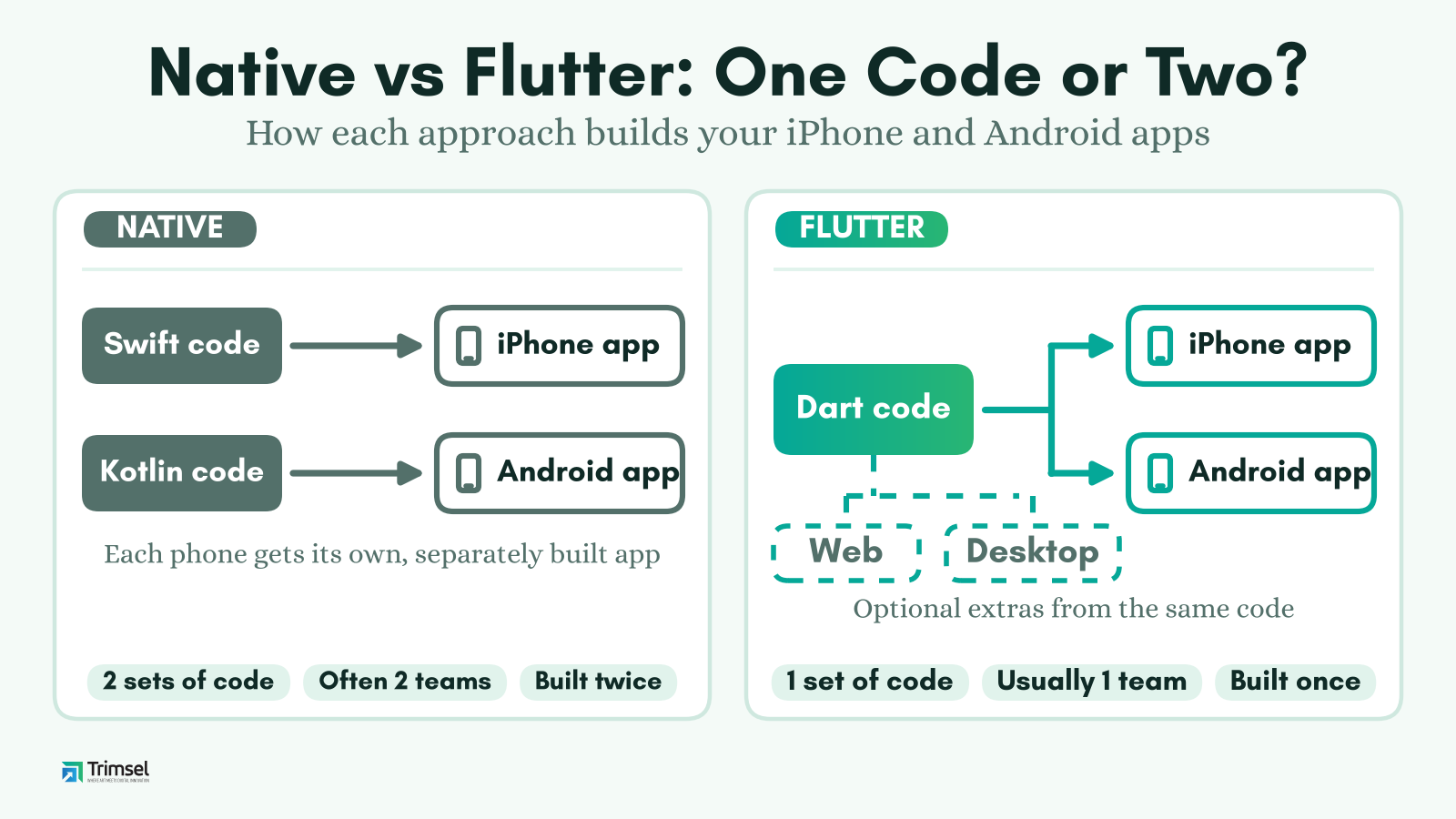
A native app is built separately for each phone system. For iPhones, developers write one app using Apple's tools, usually in a language called Swift. For Android phones, they write a second app using Google's tools, usually in a language called Kotlin.
So going native means two apps, two sets of code and often two groups of specialists. Each app is built to fit its own phone system as closely as possible.
What Is Flutter?
Flutter is a free toolkit from Google for building apps. With Flutter, developers write one set of code in a language called Dart, and it produces both an iPhone app and an Android app. The same code can also be used for web and desktop apps.
This approach is called cross-platform development. Flutter draws the app's screens itself, which is why an app built with it can look the same on an iPhone and an Android phone.
Cost
Two native apps usually mean more work than one Flutter app, because screens and features are built twice. That is why Flutter is often the lower-cost route when an app must run on both iPhone and Android.
The real difference depends on what your app does. Ask for a quote for each approach and check that both quotes cover the same work.
Time to launch
One shared set of code means one team can build both versions together. With native, two teams can work at the same time, but you need more people, and the two apps can drift apart in features if they are not managed carefully.
Speed and performance
A few years ago, native apps were clearly faster. Today, for most business apps, such as booking, ordering, delivery tracking, catalogues and dashboards, Flutter's speed is close to native, and your users are unlikely to notice a difference. Apps that push the phone hard, such as 3D games or augmented reality, can still do better as native apps.
Phone features
Both approaches can use the camera, location, notifications and payments. Native gets brand-new phone features first, because they come directly from Apple or Google. With Flutter, a new feature may arrive a little later or may need some extra native work.
Look and feel
Native apps automatically follow each phone's own style. Flutter lets you design one look and use it on both phones. That is useful if you want a strongly branded design, though your design should still feel natural to users on each phone.
Updates and maintenance
With one set of code, a fix or a new feature is built once. With two native apps, each change is built twice. Over the years, this usually makes upkeep easier with Flutter. Whichever you choose, plan a budget for updates, because Apple and Google change their rules and phone systems regularly.
When Flutter Is the Better Choice
Flutter is usually a good fit when:
- You want your app on both iPhone and Android at launch
- You have a limited budget, or you want to test your idea quickly
- Your app is mostly screens, forms, lists, bookings and payments
- You want the same brand design on both phones
- You may want a web or desktop version later
When Native Is the Better Choice
Native is usually a better fit when:
- Your app depends on advanced phone features or the newest tools from Apple or Google
- You are building 3D, augmented reality or other graphics-heavy features
- You only need one platform for now, such as iPhone only, and want the deepest fit with it
- You already have a native team or an existing native app to build on
What About React Native?
You may also hear about React Native, made by Meta. It is another cross-platform option. It uses a language called JavaScript and builds screens from each phone's own parts. Most of the points above apply to it as well.
When the choice is between Flutter and React Native, the deciding factor is often the skills of the team who will build and maintain your app.
5 Questions to Help You Decide
- Which phones must the app work on at launch? If the answer is both, cross-platform deserves a serious look.
- What must the app do on the phone? List any unusual features, such as AR, advanced camera use or Bluetooth devices.
- How fast do you need to launch, and what is your budget? Tight on both usually points to cross-platform.
- How important is one consistent brand design? If it is very important, Flutter makes it easier.
- Who will maintain the app in two years? Choose a technology your team or your partner can support for the long run.
Common Mistakes When Choosing
- Choosing native "just to be safe" for a simple app. You may pay for two apps when one would do.
- Choosing Flutter without checking your key feature. Confirm early that the feature you depend on is supported.
- Following the developer's habit. Ask why they recommend an approach for your app, not just what they usually build.
- Forgetting about updates. Apps need regular care after launch.
- Comparing quotes for different work. A cheaper quote may leave out features the other one includes.
Questions to Ask Your App Development Company
- Why do you recommend this approach for my app, and what are its downsides?
- Is any feature in my plan harder to build with this choice?
- What would it cost to build the other version?
- Who maintains the app after launch, and how are updates priced?
- Can we start with a small first version?
Get Help Choosing the Right Approach
If you would like a second opinion on your app plan, our mobile app development company in Chennai can look at your goals, features and budget and talk through the options. For more on how an app can support your business, see our guide on how mobile apps grow business
